Table of Contents
To make the Home page appear as the main page when your website is opened, there are two main steps:
first, create the Home and Blog pages, then set the Home page as the front page.
1. Check Home and Blog Pages #
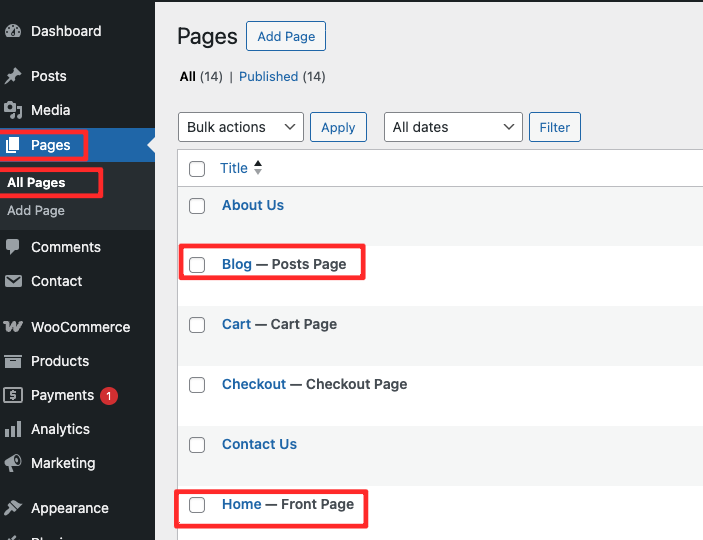
- Go to Pages → All Pages
- Make sure the Home and Blog pages are available
- Ensure both pages are published
- Confirm that the Home page is set as the Front Page
- Confirm that the Blog page is set as the Posts Page
2. Set the Homepage Display #
After the Home and Blog pages are available, check the homepage settings.
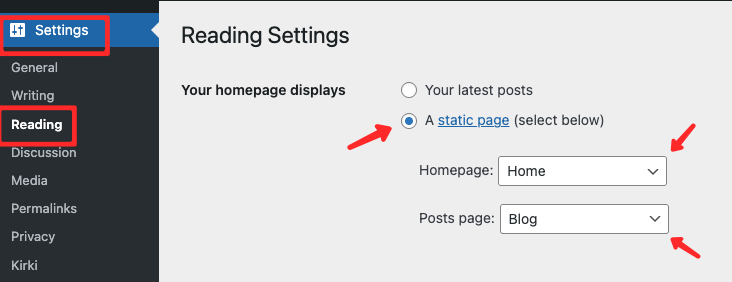
- From the admin dashboard, go to Settings → Reading.
- Under Your homepage displays, select A static page (select below).
- Set:
- Homepage: Home
- Posts page: Blog
- Click Save Changes.
After completing these steps, your website will correctly display the Home page as the main page, and the Blog page will show your latest posts.